> ## Documentation Index
> Fetch the complete documentation index at: https://docs.conversion.ai/llms.txt
> Use this file to discover all available pages before exploring further.
# Email Performance
> Monitor open rates, click-through rates, bounce rates, and unsubscribe rates across your active emails.
The **Performance** tab gives you an aggregate view of how your active emails are performing across key engagement metrics.
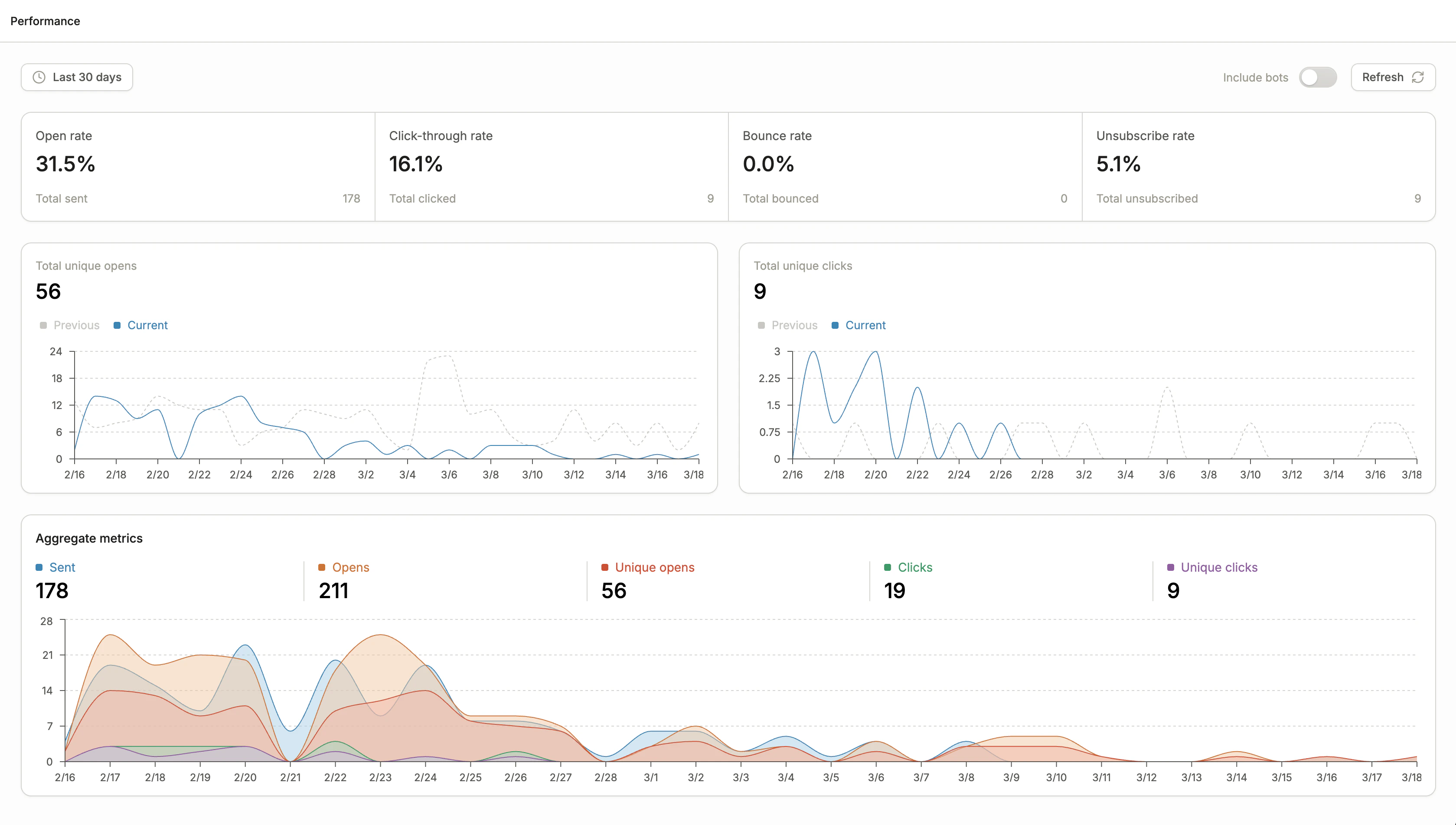 Email performance can be viewed on a global level, per email, or aggregated across a workflow.
## Metric definitions
Definitions of email performance metrics:
| Metric | Description |
| ---------------------- | ------------------------------------------------------------------------------------------------------------------------------------------------------------------------------------------ |
| **Open rate** | Percentage of sent emails that were opened at least once. |
| **Click-through rate** | Percentage of opened emails where a link was clicked at least once. |
| **Bounce rate** | Percentage of sent emails that bounced. |
| **Unsubscribe rate** | Percentage of sent emails which resulted in a recipient unsubscribing from at least one topic. |
| **Sends** | Number of emails successfully sent. |
| **Opens** | Number of times this email has been opened in total. |
| **Unique opens** | Number of emails that were opened at least once. |
| **Clicks** | Number of link clicks in total to this email. |
| **Unique clicks** | Number of emails that were clicked at least once. |
| **Delivered** | Number of emails that were successfully delivered to the contact's inbox. |
| **Not delivered** | Number of emails that did not successfully get delivered, likely due to a bounce or other rejection. |
| **Not sent** | Number of emails where the send was not attempted, which can occur for a variety of reasons. See ["Not Sent" reasons](/product-docs/emails/recipients#not-sent-reasons) for the full list. |
## Time range
Use the time range selector in the top left to filter performance data. You can choose from preset ranges such as **Today**, **Yesterday**, and **Last 30 days**, or define a **custom date range**.
All stats displayed only include activities that occur in the time range selected. For instance, the click-through rate is the number of clicks that occurred in the time window divided by the number of opens that occurred in that same window.
## Include bots toggle
Email inboxes often use automated bots to pre-scan or pre-open emails for security purposes. These bot interactions can inflate your open and click metrics.
Toggle **Include bots** off to filter out bot activity. Conversion identifies bots using two signals:
**Activity:** An open or click is flagged as a bot if it occurs within 5 seconds of the email being sent, or if a subsequent open and click happen within half a second of each other.
**Source:** Conversion checks the IP address of the open or click against known bot IP addresses. This includes those from Google and Conversion's database of recognized bot IPs.
For the most reliable performance data, keep the **Include bots** toggle off.
## Frequently Asked Questions
Firstly, Conversion only sends emails to recipients that are [subscribed](/product-docs/workspace-settings/emails-and-domains/recipients). Then, Conversion checks if the email address passes inbox validation and isn't present on our global bounce list. This can mean some recipients aren't sent the email, which will display in the **Not sent** metric. To see the specific reason each recipient wasn't sent the email, check the email's [Recipients tab](/product-docs/emails/recipients#not-sent-reasons).
Email performance can be viewed on a global level, per email, or aggregated across a workflow.
## Metric definitions
Definitions of email performance metrics:
| Metric | Description |
| ---------------------- | ------------------------------------------------------------------------------------------------------------------------------------------------------------------------------------------ |
| **Open rate** | Percentage of sent emails that were opened at least once. |
| **Click-through rate** | Percentage of opened emails where a link was clicked at least once. |
| **Bounce rate** | Percentage of sent emails that bounced. |
| **Unsubscribe rate** | Percentage of sent emails which resulted in a recipient unsubscribing from at least one topic. |
| **Sends** | Number of emails successfully sent. |
| **Opens** | Number of times this email has been opened in total. |
| **Unique opens** | Number of emails that were opened at least once. |
| **Clicks** | Number of link clicks in total to this email. |
| **Unique clicks** | Number of emails that were clicked at least once. |
| **Delivered** | Number of emails that were successfully delivered to the contact's inbox. |
| **Not delivered** | Number of emails that did not successfully get delivered, likely due to a bounce or other rejection. |
| **Not sent** | Number of emails where the send was not attempted, which can occur for a variety of reasons. See ["Not Sent" reasons](/product-docs/emails/recipients#not-sent-reasons) for the full list. |
## Time range
Use the time range selector in the top left to filter performance data. You can choose from preset ranges such as **Today**, **Yesterday**, and **Last 30 days**, or define a **custom date range**.
All stats displayed only include activities that occur in the time range selected. For instance, the click-through rate is the number of clicks that occurred in the time window divided by the number of opens that occurred in that same window.
## Include bots toggle
Email inboxes often use automated bots to pre-scan or pre-open emails for security purposes. These bot interactions can inflate your open and click metrics.
Toggle **Include bots** off to filter out bot activity. Conversion identifies bots using two signals:
**Activity:** An open or click is flagged as a bot if it occurs within 5 seconds of the email being sent, or if a subsequent open and click happen within half a second of each other.
**Source:** Conversion checks the IP address of the open or click against known bot IP addresses. This includes those from Google and Conversion's database of recognized bot IPs.
For the most reliable performance data, keep the **Include bots** toggle off.
## Frequently Asked Questions
Firstly, Conversion only sends emails to recipients that are [subscribed](/product-docs/workspace-settings/emails-and-domains/recipients). Then, Conversion checks if the email address passes inbox validation and isn't present on our global bounce list. This can mean some recipients aren't sent the email, which will display in the **Not sent** metric. To see the specific reason each recipient wasn't sent the email, check the email's [Recipients tab](/product-docs/emails/recipients#not-sent-reasons).