> ## Documentation Index
> Fetch the complete documentation index at: https://docs.conversion.ai/llms.txt
> Use this file to discover all available pages before exploring further.
# Unified Query Engine
> Learn how to segment and filter contacts throughout Conversion.
The Unified Query Engine is the shared interface for segmenting and filtering contacts across Conversion. It powers audiences, workflow triggers, workflow branches, exit conditions, and contact filters.
 ## Queries, groups, and criteria
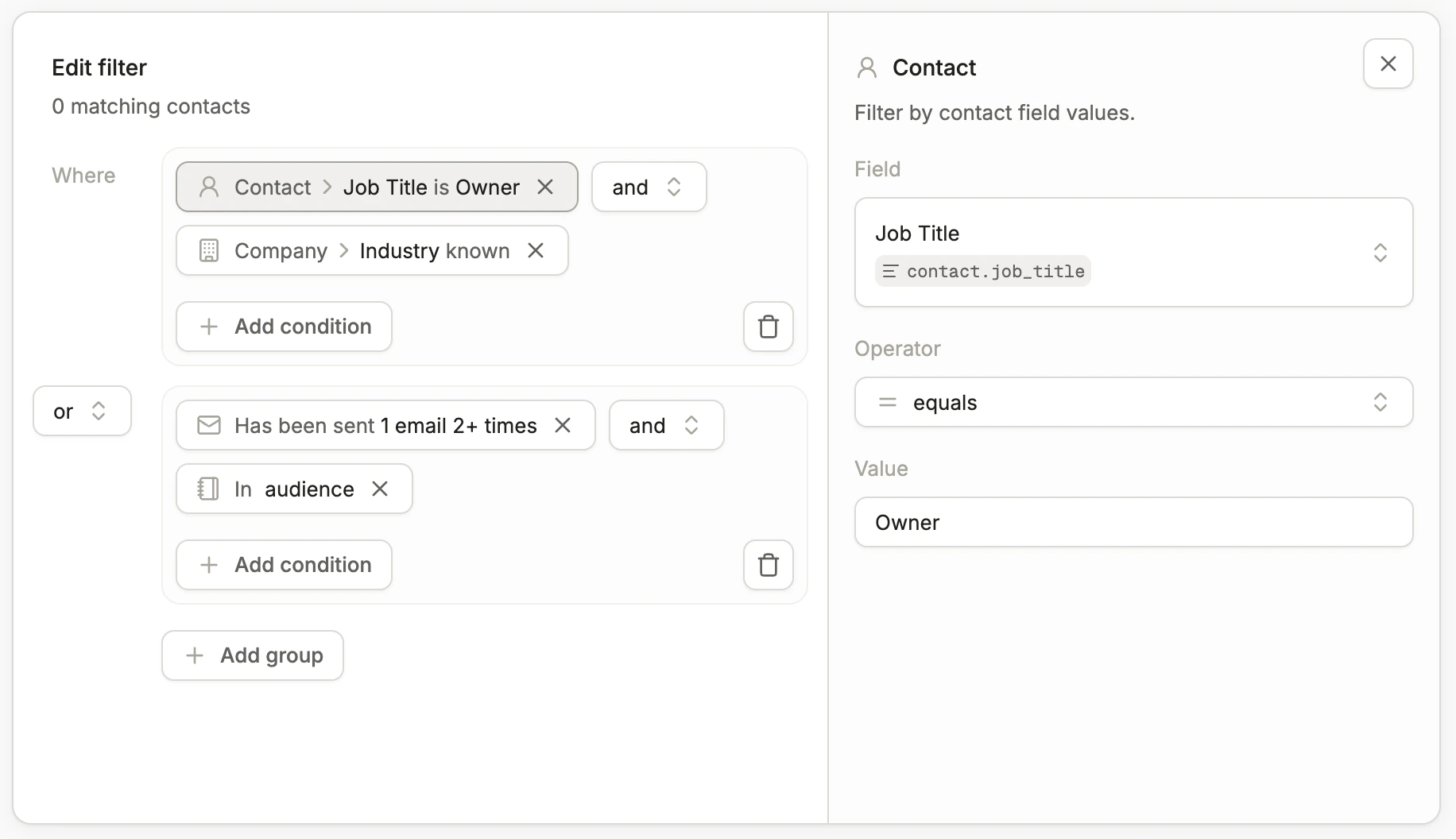
Queries are made up of **groups** and individual **criteria**:
* **Criteria** — a statement that evaluates to either true or false for a given contact (e.g., `Job Title = "CEO"`).
* **Groups** — one or more criteria joined with AND or OR logic.
You can nest criteria inside groups, and each query can contain any number of groups joined together.
## Operators
The available comparison operators depend on the field's data type.
## Queries, groups, and criteria
Queries are made up of **groups** and individual **criteria**:
* **Criteria** — a statement that evaluates to either true or false for a given contact (e.g., `Job Title = "CEO"`).
* **Groups** — one or more criteria joined with AND or OR logic.
You can nest criteria inside groups, and each query can contain any number of groups joined together.
## Operators
The available comparison operators depend on the field's data type.
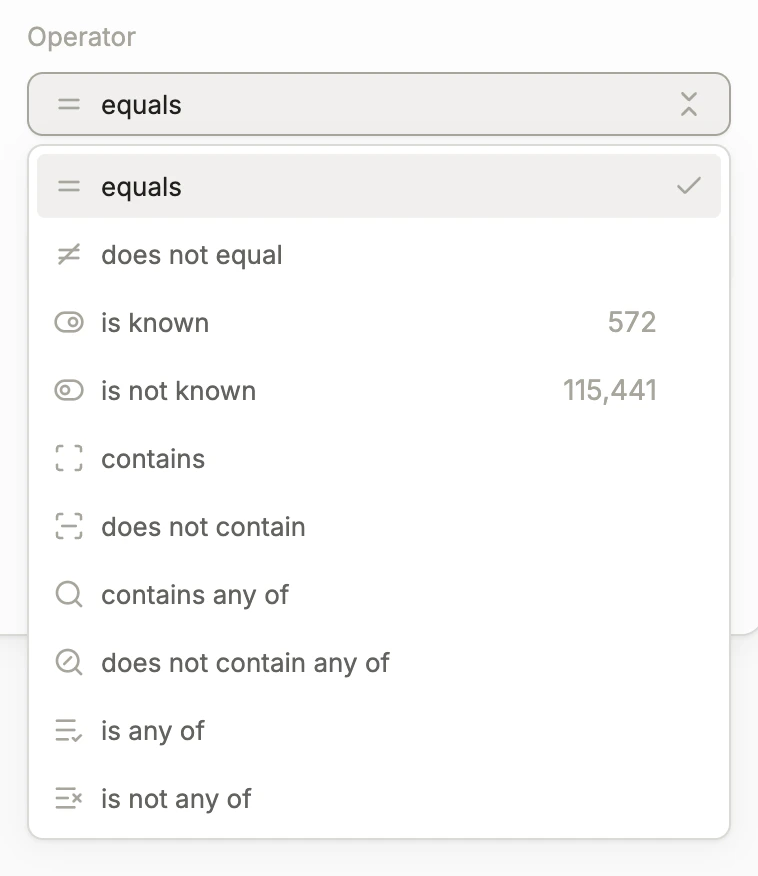 | Operator | Description |
| --------------------------- | ------------------------------------------------------------ |
| **Equals** | Field equals the given value |
| **Does not equal** | Field does not equal the given value |
| **Is known** | Field has a value |
| **Is not known** | Field does not have a value |
| **Contains** | Given value is a substring of the field's value |
| **Does not contain** | Given value is not a substring of the field's value |
| **Contains any of** | Any of the given values is a substring of the field's value |
| **Does not contain any of** | None of the given values is a substring of the field's value |
| **Is any of** | Field matches any of the given values |
| **Is not any of** | Field does not match any of the given values |
String comparisons are case insensitive.
| Operator | Description |
| ------------------------------- | ------------------------------------------------- |
| **Equals** | Field equals the given value |
| **Does not equal** | Field does not equal the given value |
| **Is known** | Field has a value |
| **Is not known** | Field does not have a value |
| **Is greater than** | Field is greater than the given value |
| **Is greater than or equal to** | Field is greater than or equal to the given value |
| **Is less than** | Field is less than the given value |
| **Is less than or equal to** | Field is less than or equal to the given value |
| Operator | Description |
| ------------------ | ------------------------------------ |
| **Equals** | Field equals the given value |
| **Does not equal** | Field does not equal the given value |
| **Is known** | Field has a value |
| **Is not known** | Field does not have a value |
A boolean value of `false` does not mean the field is unknown.
| Operator | Description |
| ------------------- | ------------------------------------ |
| **Equals** | Field equals the given date |
| **Does not equal** | Field does not equal the given date |
| **Is known** | Field has a value |
| **Is not known** | Field does not have a value |
| **Is after** | Field is after the given date |
| **Is on or after** | Field is on or after the given date |
| **Is before** | Field is before the given date |
| **Is on or before** | Field is on or before the given date |
| Operator | Description |
| ------------------- | ---------------------------------------- |
| **Equals** | Field equals the given datetime |
| **Does not equal** | Field does not equal the given datetime |
| **Is known** | Field has a value |
| **Is not known** | Field does not have a value |
| **Is after** | Field is after the given datetime |
| **Is on or after** | Field is on or after the given datetime |
| **Is before** | Field is before the given datetime |
| **Is on or before** | Field is on or before the given datetime |
For "is known / is not known" criteria, if the criterion involves an object other than the contact (e.g., an opportunity) and there are no objects linked to the contact, the field is evaluated as **not known**.
## Criteria types
### Contact
Filter by contact field values. Select a field, an operator, and enter a value to compare against.
### Company
Filter by the contact's company fields. Select a field, an operator, and enter a value to compare against.
Each contact either has company data directly attached or has a linked company.
### Opportunities
Match contacts linked to opportunities, either through their company or an [Opportunity Contact Role](https://help.salesforce.com/s/articleView?id=sales.sales_core_opp_contact_roles.htm\&type=5). You can narrow results by adding field and role constraints.
| Setting | Description |
| ---------- | ----------------------------------------------------------------------------------------------------------------------------------------------------------------------------------------- |
| **Fields** | Filter on opportunity field values such as amount, stage, or close date. Select a field, an operator, and enter a value. You can specify any number of fields the opportunity must match. |
| **Role** | Specify the contact's role on the opportunity: primary contact, not primary contact, a specific role, or no role. |
### Audiences
Filter contacts based on the audiences they belong to or do not belong to. You can select any number of audiences in a single criterion.
### Campaigns
Filter contacts based on the campaigns they are members of or not members of. You can select any number of campaigns in a single criterion.
### Page visit
Filter contacts based on the web pages they have visited.
Toggle between **Has visited** and **Has not visited** to filter for contacts who have or have not visited a page.
Website activity tracking is limited by cookie policies and settings. Conversion can only track activity when the pixel is loaded during a contact's session.
| Setting | Description |
| ------------------------- | ------------------------------------------------------------------------------------------------------------------------------ |
| **URL contains** | Filter on text within the page visit URL (e.g., `pricing`) |
| **UTM source contains** | Filter on text within the UTM source field (e.g., `google`) |
| **UTM campaign contains** | Filter on text within the UTM campaign field (e.g., `mopsapalooza-conference`) |
| **UTM term contains** | Filter on text within the UTM term field (e.g., `product-data`) |
| **Frequency** | Minimum number of times a contact must have visited the page (e.g., at least 1 time) |
| **Time frame** | Optional time window for when the visit occurred, configured relative to the current timestamp (e.g., within the past 4 weeks) |
Leaving all filters blank matches any page visit.
### Email
Filter contacts based on their interactions with emails sent from Conversion.
Select an activity type:
* Has been sent
* Has not been sent
* Opened
* Has not opened
* Clicked a link
* Has not clicked a link
All email activity has bots filtered out by default.
| Setting | Description |
| -------------- | ------------------------------------------------------------------------------------------------------------------------------------------------------------ |
| **Emails** | Select specific emails to filter on. The criterion matches contacts with the selected activity for any of the chosen emails. Leave blank to match any email. |
| **Frequency** | Minimum number of times the activity must have occurred (e.g., at least 1 time) |
| **Time frame** | Optional time window for when the activity occurred, configured relative to the current timestamp |
### Form submission
Filter contacts based on form submissions tracked in Conversion.
Toggle between **Has submitted** and **Has not submitted** to filter for contacts who have or have not submitted a form.
| Setting | Description |
| -------------- | ------------------------------------------------------------------------------------------------------------------------------------------ |
| **Forms** | Select specific forms to filter on. The criterion matches contacts who submitted any of the selected forms. Leave blank to match any form. |
| **Frequency** | Minimum number of times the form must have been submitted (e.g., at least 1 time) |
| **Time frame** | Optional time window for when the submission occurred, configured relative to the current timestamp (e.g., within the past 30 days) |
### Custom event
Filter contacts based on custom events tracked via the [Events API](/api-reference/overview).
You can toggle between **Has occurred** and **Has not occurred** to filter for contacts who have or have not had a specific event tracked.
**Event**\
Enter the name of the custom event to filter on (e.g., `LOG_IN`, `feature_activated`).
**Frequency**\
Specify the minimum number of times the event must have occurred. (Example: at least 1 time.)
**Time frame**\
Optionally add a time frame to filter on when the event occurred. Time frames can be configured relative to the current timestamp. (Example: event occurred within the past 7 days.)
### Workflow
Filter contacts based on workflows they have entered or exited in Conversion.
Select whether a contact **has entered** or **has exited** a workflow.
| Setting | Description |
| -------------- | -------------------------------------------------------------------------------------------------------------------------------------------------------------- |
| **Workflows** | Select specific workflows to filter on. The criterion matches contacts who entered or exited any of the selected workflows. Leave blank to match any workflow. |
| **Frequency** | Minimum number of times the contact must have entered or exited the workflow (e.g., at least 1 time) |
| **Time frame** | Optional time window for when the entry or exit occurred, configured relative to the current timestamp |
## Querying inside workflows
When you build a query inside a [workflow](/product-docs/workflows/overview), event-based criteria (such as page visits, email activity, form submissions, and custom events) include an additional **Reference triggering event** option.
### Reference triggering event
Enabling **Reference triggering event** scopes the criterion to the specific event that triggered the workflow, rather than evaluating against all matching events in the contact's history.
* If the workflow was not triggered by an event, or was triggered by an event of a different type, the criterion will never match the contact running through the workflow.
* If the workflow was triggered by a matching event, the criterion evaluates against that single event only.
Use this when you care about scoping the query to the event that triggered the workflow. Leave it disabled when you want the query to apply to all events in the contact's history.
| Operator | Description |
| --------------------------- | ------------------------------------------------------------ |
| **Equals** | Field equals the given value |
| **Does not equal** | Field does not equal the given value |
| **Is known** | Field has a value |
| **Is not known** | Field does not have a value |
| **Contains** | Given value is a substring of the field's value |
| **Does not contain** | Given value is not a substring of the field's value |
| **Contains any of** | Any of the given values is a substring of the field's value |
| **Does not contain any of** | None of the given values is a substring of the field's value |
| **Is any of** | Field matches any of the given values |
| **Is not any of** | Field does not match any of the given values |
String comparisons are case insensitive.
| Operator | Description |
| ------------------------------- | ------------------------------------------------- |
| **Equals** | Field equals the given value |
| **Does not equal** | Field does not equal the given value |
| **Is known** | Field has a value |
| **Is not known** | Field does not have a value |
| **Is greater than** | Field is greater than the given value |
| **Is greater than or equal to** | Field is greater than or equal to the given value |
| **Is less than** | Field is less than the given value |
| **Is less than or equal to** | Field is less than or equal to the given value |
| Operator | Description |
| ------------------ | ------------------------------------ |
| **Equals** | Field equals the given value |
| **Does not equal** | Field does not equal the given value |
| **Is known** | Field has a value |
| **Is not known** | Field does not have a value |
A boolean value of `false` does not mean the field is unknown.
| Operator | Description |
| ------------------- | ------------------------------------ |
| **Equals** | Field equals the given date |
| **Does not equal** | Field does not equal the given date |
| **Is known** | Field has a value |
| **Is not known** | Field does not have a value |
| **Is after** | Field is after the given date |
| **Is on or after** | Field is on or after the given date |
| **Is before** | Field is before the given date |
| **Is on or before** | Field is on or before the given date |
| Operator | Description |
| ------------------- | ---------------------------------------- |
| **Equals** | Field equals the given datetime |
| **Does not equal** | Field does not equal the given datetime |
| **Is known** | Field has a value |
| **Is not known** | Field does not have a value |
| **Is after** | Field is after the given datetime |
| **Is on or after** | Field is on or after the given datetime |
| **Is before** | Field is before the given datetime |
| **Is on or before** | Field is on or before the given datetime |
For "is known / is not known" criteria, if the criterion involves an object other than the contact (e.g., an opportunity) and there are no objects linked to the contact, the field is evaluated as **not known**.
## Criteria types
### Contact
Filter by contact field values. Select a field, an operator, and enter a value to compare against.
### Company
Filter by the contact's company fields. Select a field, an operator, and enter a value to compare against.
Each contact either has company data directly attached or has a linked company.
### Opportunities
Match contacts linked to opportunities, either through their company or an [Opportunity Contact Role](https://help.salesforce.com/s/articleView?id=sales.sales_core_opp_contact_roles.htm\&type=5). You can narrow results by adding field and role constraints.
| Setting | Description |
| ---------- | ----------------------------------------------------------------------------------------------------------------------------------------------------------------------------------------- |
| **Fields** | Filter on opportunity field values such as amount, stage, or close date. Select a field, an operator, and enter a value. You can specify any number of fields the opportunity must match. |
| **Role** | Specify the contact's role on the opportunity: primary contact, not primary contact, a specific role, or no role. |
### Audiences
Filter contacts based on the audiences they belong to or do not belong to. You can select any number of audiences in a single criterion.
### Campaigns
Filter contacts based on the campaigns they are members of or not members of. You can select any number of campaigns in a single criterion.
### Page visit
Filter contacts based on the web pages they have visited.
Toggle between **Has visited** and **Has not visited** to filter for contacts who have or have not visited a page.
Website activity tracking is limited by cookie policies and settings. Conversion can only track activity when the pixel is loaded during a contact's session.
| Setting | Description |
| ------------------------- | ------------------------------------------------------------------------------------------------------------------------------ |
| **URL contains** | Filter on text within the page visit URL (e.g., `pricing`) |
| **UTM source contains** | Filter on text within the UTM source field (e.g., `google`) |
| **UTM campaign contains** | Filter on text within the UTM campaign field (e.g., `mopsapalooza-conference`) |
| **UTM term contains** | Filter on text within the UTM term field (e.g., `product-data`) |
| **Frequency** | Minimum number of times a contact must have visited the page (e.g., at least 1 time) |
| **Time frame** | Optional time window for when the visit occurred, configured relative to the current timestamp (e.g., within the past 4 weeks) |
Leaving all filters blank matches any page visit.
### Email
Filter contacts based on their interactions with emails sent from Conversion.
Select an activity type:
* Has been sent
* Has not been sent
* Opened
* Has not opened
* Clicked a link
* Has not clicked a link
All email activity has bots filtered out by default.
| Setting | Description |
| -------------- | ------------------------------------------------------------------------------------------------------------------------------------------------------------ |
| **Emails** | Select specific emails to filter on. The criterion matches contacts with the selected activity for any of the chosen emails. Leave blank to match any email. |
| **Frequency** | Minimum number of times the activity must have occurred (e.g., at least 1 time) |
| **Time frame** | Optional time window for when the activity occurred, configured relative to the current timestamp |
### Form submission
Filter contacts based on form submissions tracked in Conversion.
Toggle between **Has submitted** and **Has not submitted** to filter for contacts who have or have not submitted a form.
| Setting | Description |
| -------------- | ------------------------------------------------------------------------------------------------------------------------------------------ |
| **Forms** | Select specific forms to filter on. The criterion matches contacts who submitted any of the selected forms. Leave blank to match any form. |
| **Frequency** | Minimum number of times the form must have been submitted (e.g., at least 1 time) |
| **Time frame** | Optional time window for when the submission occurred, configured relative to the current timestamp (e.g., within the past 30 days) |
### Custom event
Filter contacts based on custom events tracked via the [Events API](/api-reference/overview).
You can toggle between **Has occurred** and **Has not occurred** to filter for contacts who have or have not had a specific event tracked.
**Event**\
Enter the name of the custom event to filter on (e.g., `LOG_IN`, `feature_activated`).
**Frequency**\
Specify the minimum number of times the event must have occurred. (Example: at least 1 time.)
**Time frame**\
Optionally add a time frame to filter on when the event occurred. Time frames can be configured relative to the current timestamp. (Example: event occurred within the past 7 days.)
### Workflow
Filter contacts based on workflows they have entered or exited in Conversion.
Select whether a contact **has entered** or **has exited** a workflow.
| Setting | Description |
| -------------- | -------------------------------------------------------------------------------------------------------------------------------------------------------------- |
| **Workflows** | Select specific workflows to filter on. The criterion matches contacts who entered or exited any of the selected workflows. Leave blank to match any workflow. |
| **Frequency** | Minimum number of times the contact must have entered or exited the workflow (e.g., at least 1 time) |
| **Time frame** | Optional time window for when the entry or exit occurred, configured relative to the current timestamp |
## Querying inside workflows
When you build a query inside a [workflow](/product-docs/workflows/overview), event-based criteria (such as page visits, email activity, form submissions, and custom events) include an additional **Reference triggering event** option.
### Reference triggering event
Enabling **Reference triggering event** scopes the criterion to the specific event that triggered the workflow, rather than evaluating against all matching events in the contact's history.
* If the workflow was not triggered by an event, or was triggered by an event of a different type, the criterion will never match the contact running through the workflow.
* If the workflow was triggered by a matching event, the criterion evaluates against that single event only.
Use this when you care about scoping the query to the event that triggered the workflow. Leave it disabled when you want the query to apply to all events in the contact's history.