> ## Documentation Index
> Fetch the complete documentation index at: https://docs.conversion.ai/llms.txt
> Use this file to discover all available pages before exploring further.
# Slack Messages
> Send automated Slack notifications and alerts from your workflows to keep your team in sync.
The Slack Message node sends automated messages to Slack channels as contacts pass through a workflow. Use it to alert sales reps about high-intent leads, notify customer success teams of lifecycle changes, or push real-time updates to any channel your team monitors.
## Prerequisites
You must connect your Slack workspace before using this node. See [Slack integration](/product-docs/workspace-settings/integrations/slack) for setup instructions.
## Configuration
| Setting | Description |
| ------------- | -------------------------------------------------------------------------------------------------------------------------------------- |
| **Workspace** | Select which connected Slack workspace to use (relevant if you have multiple workspaces connected). |
| **Channel** | Choose the public or private channel where the message will be posted. Private channels only appear if `@Conversion` has been invited. |
| **Message** | Compose the message content. Use static text, dynamic variables, or a combination of both. |
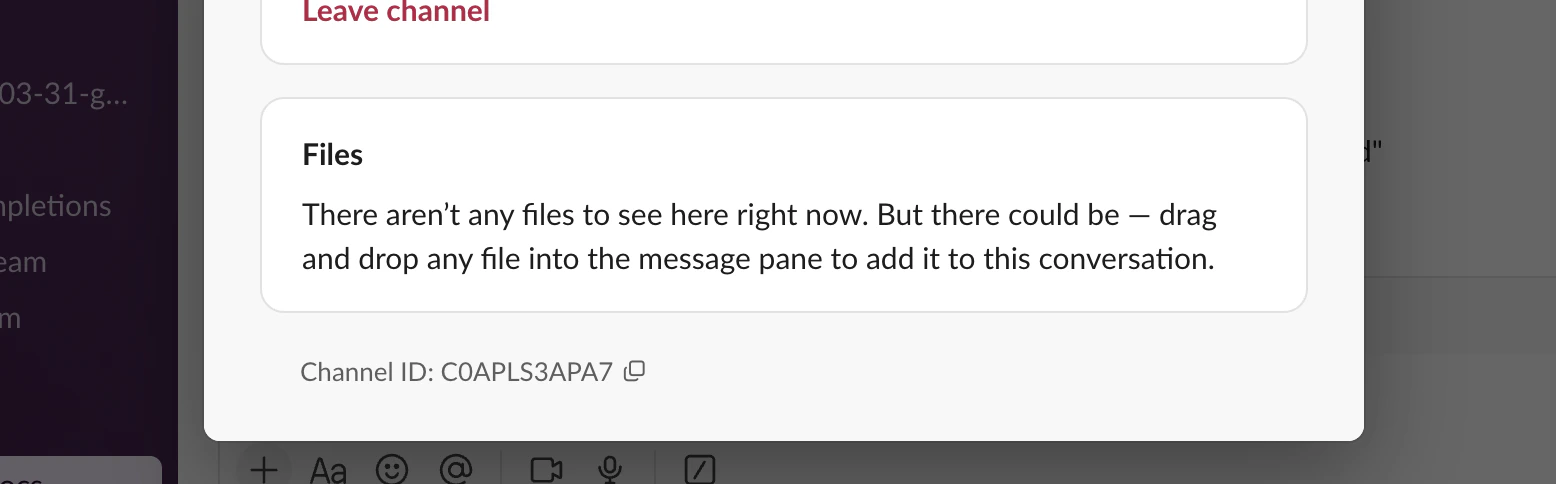
If the channel you are looking for isn't appearing in the dropdown, you can paste in the `Channel ID` (found under the channel Settings → About) into the search bar.
 ### Dynamic values in messages
Type `/` in the message field to open the command menu and insert liquid expressions, contact fields, or tokens. Values resolve at runtime with the contact's current data.
Text inputs in this node support [Liquid templating](/product-docs/liquid/overview). Type `/` to choose from **Add liquid**, **Add a field**, or **Add a token** to insert dynamic values.
Example message:
```text theme={null}
New lead added: {{First Name}} {{Last Name}} at {{Company Name}} ({{Job Title}})
```
Any CRM-mapped, custom, or system field is available for insertion. If a field has no value for a given contact, that portion of the message is simply omitted — no errors or formatting breaks occur.
Opportunity data isn't available through **Add a field** — opportunity fields can only be referenced via Liquid. To insert the most recent opportunity's name, amount, or stage, choose **Add liquid** and use the `company._opportunities` object. See [Opportunities in Liquid](/product-docs/liquid/overview#opportunities) for the full syntax and an example Slack message.
## Behavior
* The node sends one Slack message per contact that passes through it.
* Messages are sent immediately when the contact reaches the node (subject to any upstream delays).
* If the Slack workspace is disconnected or the channel no longer exists, the message fails silently and the contact continues to the next node.
## Use cases
| Use case | Channel | Message content |
| ----------------- | -------------------- | ---------------------------------------------------------------------------- |
| **Sales alerts** | #sales-alerts | New high-intent lead with enrichment data (name, company, title, lead score) |
| **Marketing ops** | #marketing-ops | Campaign performance updates, audience changes |
| **CS hand-offs** | #customer-success | Lifecycle stage transitions, churn risk indicators |
| **Deal desk** | #deal-desk (private) | Opportunity value or stage milestones |
## Troubleshooting
| Issue | Solution |
| --------------------------------------- | ----------------------------------------------------------------------------------------------------------- |
| Private channel not visible in selector | Invite `@Conversion` to the channel with `/invite @Conversion` |
| Message not sending | Verify the workspace connection in **Settings > Integrations**. Confirm the target channel is still active. |
| Variables not resolving | Ensure the fields are mapped in your CRM/MAP integration and have values on the contact record. |
### Dynamic values in messages
Type `/` in the message field to open the command menu and insert liquid expressions, contact fields, or tokens. Values resolve at runtime with the contact's current data.
Text inputs in this node support [Liquid templating](/product-docs/liquid/overview). Type `/` to choose from **Add liquid**, **Add a field**, or **Add a token** to insert dynamic values.
Example message:
```text theme={null}
New lead added: {{First Name}} {{Last Name}} at {{Company Name}} ({{Job Title}})
```
Any CRM-mapped, custom, or system field is available for insertion. If a field has no value for a given contact, that portion of the message is simply omitted — no errors or formatting breaks occur.
Opportunity data isn't available through **Add a field** — opportunity fields can only be referenced via Liquid. To insert the most recent opportunity's name, amount, or stage, choose **Add liquid** and use the `company._opportunities` object. See [Opportunities in Liquid](/product-docs/liquid/overview#opportunities) for the full syntax and an example Slack message.
## Behavior
* The node sends one Slack message per contact that passes through it.
* Messages are sent immediately when the contact reaches the node (subject to any upstream delays).
* If the Slack workspace is disconnected or the channel no longer exists, the message fails silently and the contact continues to the next node.
## Use cases
| Use case | Channel | Message content |
| ----------------- | -------------------- | ---------------------------------------------------------------------------- |
| **Sales alerts** | #sales-alerts | New high-intent lead with enrichment data (name, company, title, lead score) |
| **Marketing ops** | #marketing-ops | Campaign performance updates, audience changes |
| **CS hand-offs** | #customer-success | Lifecycle stage transitions, churn risk indicators |
| **Deal desk** | #deal-desk (private) | Opportunity value or stage milestones |
## Troubleshooting
| Issue | Solution |
| --------------------------------------- | ----------------------------------------------------------------------------------------------------------- |
| Private channel not visible in selector | Invite `@Conversion` to the channel with `/invite @Conversion` |
| Message not sending | Verify the workspace connection in **Settings > Integrations**. Confirm the target channel is still active. |
| Variables not resolving | Ensure the fields are mapped in your CRM/MAP integration and have values on the contact record. |