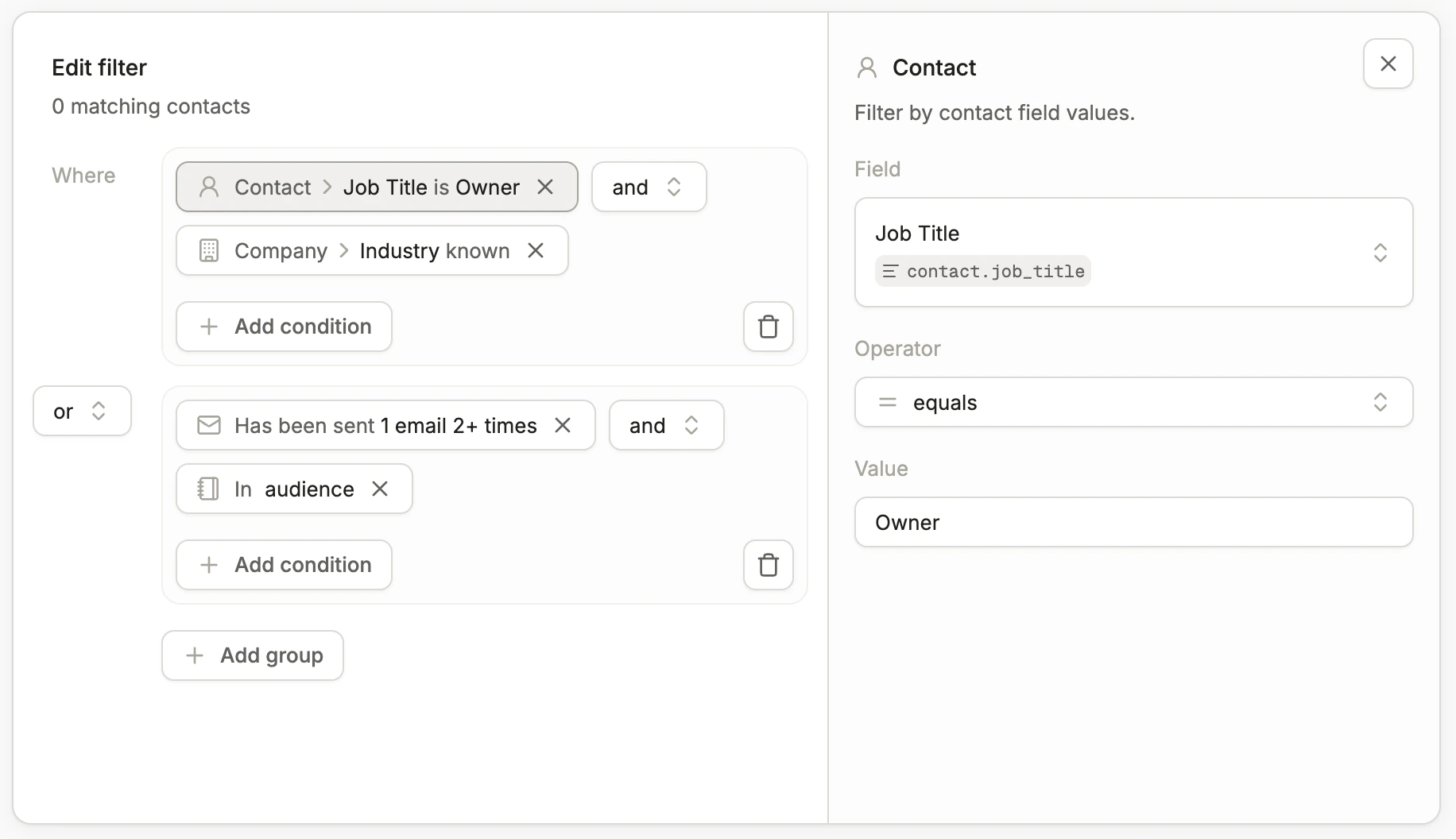
The Unified Query Engine is the shared interface for segmenting and filtering contacts across Conversion. It powers audiences, workflow triggers, workflow branches, exit conditions, and contact filters.
Unified Query Engine condition builder

Queries, groups, and criteria

Queries are made up of groups and individual criteria:
  • Criteria — a statement that evaluates to either true or false for a given contact (e.g., Job Title = "CEO").
  • Groups — one or more criteria joined with AND or OR logic.
You can nest criteria inside groups, and each query can contain any number of groups joined together.

Operators

The available comparison operators depend on the field’s data type. Operator selection dropdown in the Unified Query Engine
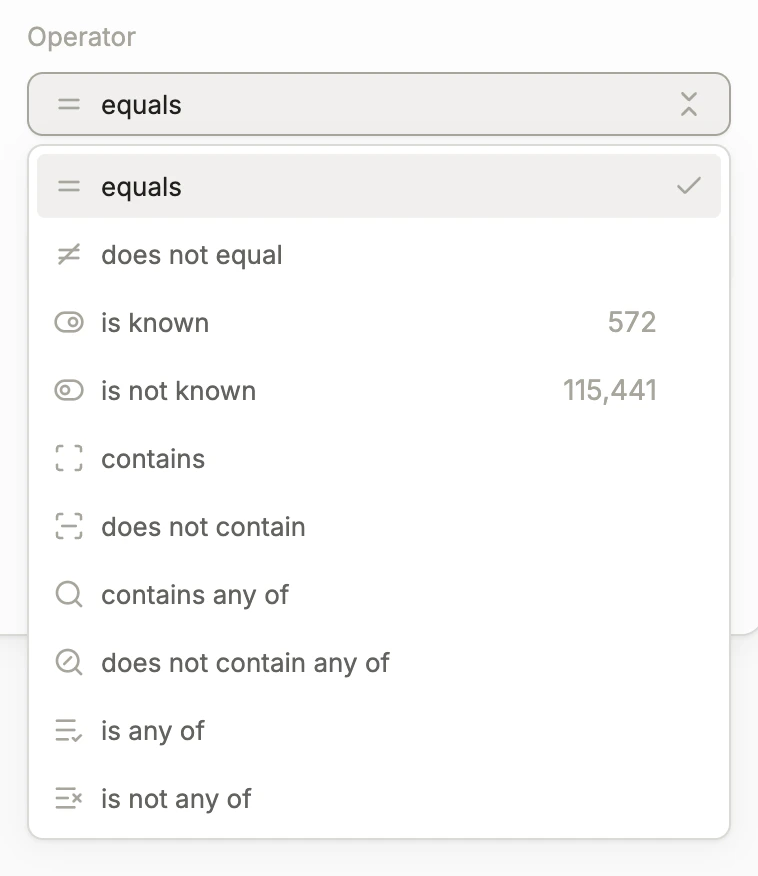
String

OperatorDescription
EqualsField equals the given value
Does not equalField does not equal the given value
Is knownField has a value
Is not knownField does not have a value
ContainsGiven value is a substring of the field’s value
Does not containGiven value is not a substring of the field’s value
Contains any ofAny of the given values is a substring of the field’s value
Does not contain any ofNone of the given values is a substring of the field’s value
Is any ofField matches any of the given values
Is not any ofField does not match any of the given values
String comparisons are case insensitive.
OperatorDescription
EqualsField equals the given value
Does not equalField does not equal the given value
Is knownField has a value
Is not knownField does not have a value
Is greater thanField is greater than the given value
Is greater than or equal toField is greater than or equal to the given value
Is less thanField is less than the given value
Is less than or equal toField is less than or equal to the given value
OperatorDescription
EqualsField equals the given value
Does not equalField does not equal the given value
Is knownField has a value
Is not knownField does not have a value
A boolean value of false does not mean the field is unknown.
OperatorDescription
EqualsField equals the given date
Does not equalField does not equal the given date
Is knownField has a value
Is not knownField does not have a value
Is afterField is after the given date
Is on or afterField is on or after the given date
Is beforeField is before the given date
Is on or beforeField is on or before the given date
OperatorDescription
EqualsField equals the given datetime
Does not equalField does not equal the given datetime
Is knownField has a value
Is not knownField does not have a value
Is afterField is after the given datetime
Is on or afterField is on or after the given datetime
Is beforeField is before the given datetime
Is on or beforeField is on or before the given datetime
For “is known / is not known” criteria, if the criterion involves an object other than the contact (e.g., an opportunity) and there are no objects linked to the contact, the field is evaluated as not known.

Criteria types

Contact

Filter by contact field values. Select a field, an operator, and enter a value to compare against.

Company

Filter by the contact’s company fields. Select a field, an operator, and enter a value to compare against. Each contact either has company data directly attached or has a linked company.

Opportunities

Match contacts linked to opportunities, either through their company or an Opportunity Contact Role. You can narrow results by adding field and role constraints.
SettingDescription
FieldsFilter on opportunity field values such as amount, stage, or close date. Select a field, an operator, and enter a value. You can specify any number of fields the opportunity must match.
RoleSpecify the contact’s role on the opportunity: primary contact, not primary contact, a specific role, or no role.

Audiences

Filter contacts based on the audiences they belong to or do not belong to. You can select any number of audiences in a single criterion.

Campaigns

Filter contacts based on the campaigns they are members of or not members of. You can select any number of campaigns in a single criterion.

Page visit

Filter contacts based on the web pages they have visited. Toggle between Has visited and Has not visited to filter for contacts who have or have not visited a page.
Website activity tracking is limited by cookie policies and settings. Conversion can only track activity when the pixel is loaded during a contact’s session.
SettingDescription
URL containsFilter on text within the page visit URL (e.g., pricing)
UTM source containsFilter on text within the UTM source field (e.g., google)
UTM campaign containsFilter on text within the UTM campaign field (e.g., mopsapalooza-conference)
UTM term containsFilter on text within the UTM term field (e.g., product-data)
FrequencyMinimum number of times a contact must have visited the page (e.g., at least 1 time)
Time frameOptional time window for when the visit occurred, configured relative to the current timestamp (e.g., within the past 4 weeks)
Leaving all filters blank matches any page visit.

Email

Filter contacts based on their interactions with emails sent from Conversion. Select an activity type:
  • Has been sent
  • Has not been sent
  • Opened
  • Has not opened
  • Clicked a link
  • Has not clicked a link
All email activity has bots filtered out by default.
SettingDescription
EmailsSelect specific emails to filter on. The criterion matches contacts with the selected activity for any of the chosen emails. Leave blank to match any email.
FrequencyMinimum number of times the activity must have occurred (e.g., at least 1 time)
Time frameOptional time window for when the activity occurred, configured relative to the current timestamp

Form submission

Filter contacts based on form submissions tracked in Conversion. Toggle between Has submitted and Has not submitted to filter for contacts who have or have not submitted a form.
SettingDescription
FormsSelect specific forms to filter on. The criterion matches contacts who submitted any of the selected forms. Leave blank to match any form.
FrequencyMinimum number of times the form must have been submitted (e.g., at least 1 time)
Time frameOptional time window for when the submission occurred, configured relative to the current timestamp (e.g., within the past 30 days)

Custom event

Filter contacts based on custom events tracked via the Events API. You can toggle between Has occurred and Has not occurred to filter for contacts who have or have not had a specific event tracked. Event
Enter the name of the custom event to filter on (e.g., LOG_IN, feature_activated).
Frequency
Specify the minimum number of times the event must have occurred. (Example: at least 1 time.)
Time frame
Optionally add a time frame to filter on when the event occurred. Time frames can be configured relative to the current timestamp. (Example: event occurred within the past 7 days.)

Workflow

Filter contacts based on workflows they have entered or exited in Conversion. Select whether a contact has entered or has exited a workflow.
SettingDescription
WorkflowsSelect specific workflows to filter on. The criterion matches contacts who entered or exited any of the selected workflows. Leave blank to match any workflow.
FrequencyMinimum number of times the contact must have entered or exited the workflow (e.g., at least 1 time)
Time frameOptional time window for when the entry or exit occurred, configured relative to the current timestamp